
14th August 08:30
Microsoft 365 Migration Update
Lewis Burgess, Director of IT
We have completed the majority of the migration from Ifield’s Microsoft 365 environment to the Trust’s one. This will allow for improved collaboration and communication between Ifield CC and the rest of the Trust.
There are a few things left to finish off, including some ‘3rd party apps’ which use your Microsoft login to authenticate and cleaning up some of the settings on the PCs around school. I also need to share MS Forms templates back with staff who shared them with me.
The ‘not great’ news:
- Unfortunately it is impossible to copy saved passwords from the web browser (Edge/Chrome) across and I’m very sorry, but these cannot be saved. This is a limitation with Microsoft and completely unavoidable. I appreciate this is highly frustrating and I can only apologise.
- Bookmarks/favourites can be copied. However IT must do this for you and we are in the process of doing so. Further info on this soon.
Current (temporary) issue:
- When logging in to a school computer, it may still try to automatically connect to the old environment. If you see it trying to log in as [email protected] (no .uk) then this is the old system and the computer hasn’t picked up the new config yet. Richard and I have been working on this, this week. Richard is back on Monday so can finish off this work then.
- In the meantime, you can open Outlook via the web browser. Please go to https://outlook.office.com and log in as instructed below.
What’s changed:
Staff
Your username
- Your school login username remains the same as before – nothing has changed with the computers in school. For example, if your username was abc to log in to a PC, it still is.
- Your full cloud username remains the same, too. This looks like an email address but it’s treated slightly differently. This is abc@ifieldcc.co.uk
Email & Calendars
- All old emails and calendars have been copied to your new mailbox.
- Your email address is now your first initial + surname @ ifieldcc.org.uk, for example: [email protected] – This is the email address that will be used when you send email messages.
- Your old email address still works and belongs to the same mailbox, meaning any messages sent to it will arrive in the same place. e.g. [email protected] will deliver to your normal inbox.
- To avoid any potential confusion, I have also added another email address alias to all staff accounts which is your [email protected], e.g. [email protected]. These also get delivered to your normal inbox.
- If you shared your calendar with someone else, you will need to re-share it. If you’re not sure how to do so, please contact IT Support.
- If you had access to a shared mailbox, you should still see this connection as we copied the permissions across – if not, let us know.
- Any distribution list memberships will have been re-instated. However the addresses for these will have changed. For example: all{something}@ifieldcc.org.uk – the name of any distribution list is now prefixed with ICC.
- The address book in Outlook will default to showing ICC staff & students and TCT Central staff, but staff can search for anyone else in the organisation.
- Automatic signatures for staff and students are still being worked on.
OneDrive
- Your OneDrive files have been copied across and be in your OneDrive account as normal
- Any files which you shared with others will need to be re-shared
Students
Your username
- Your school login username remains the same as before – nothing has changed with the network in school. For example, if your username was i18asmith to log in to a PC, it still is.
- Your full cloud username remains the same, too. This looks like an email address but it’s treated slightly differently. This is i18asmith@ifieldcc.co.uk
Email & Calendars
- Your email address is your username @ ifieldcc.org.uk, for example: [email protected] – This is the email address that will be used when you send email messages.
- Your old email address still works and belongs to the same mailbox, meaning any messages sent to it will arrive in the same place. e.g. [email protected] will deliver to your normal inbox.
- The address book in Outlook will default to showing ICC staff & students.
OneDrive
- Your OneDrive files have been copied across and be in your OneDrive account as normal
- Any files which you shared with others will need to be re-shared
Everyone
Logging in
- To log in to email via a web browser, please visit: https://outlook.office.com
- When logging in you can use either your full cloud username or your email address (see above)
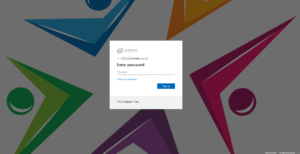
- Instead of the orange ICC login page you will now see the Trust’s login page:

- You will need to re-register your Multi-Factor Authentication with the Microsoft Authenticator app. We no longer support text messages for one-time passwords. You will be prompted to do this soon and we will be available to help on the INSET days with this.
- If you added email to your phone, you should remove the account and re-add it.
Teams
- We are in the process of copying select 2024- Teams to the new environment. This takes a while and is a lower priority to email and OneDrive, so it’s still in progress.
11th August – 17:18
- Ifield’s Microsoft Office systems have been moved to the Trust’s
- Staff & students may not yet be able to log in, whilst systems are still updating
- Some email is being delayed with ‘554’ errors – these should retry and arrive later on.
- Shared mailboxes, distribution lists, address lists are all to be worked on tomorrow
- Teams have not yet been moved
- OneDrive data should now be present (once you can log in) but we will run a further ‘update sync’
- There is a significant amount of work yet to be done. Further updates will appear here.
11th August – 09:00
Migration day!
- MS Teams are now going offline.
- All email will shortly cease for a temporary period. Senders may receive a warning message, which is normal, but emails will still retry and then arrive later.
- Staff will shortly be unable to log in to Microsoft Office 365 – such as OneDrive, Email.
- Please do not use email or Office 365 services until further notice.